
Visualizing the Scoreboard: Total Response Decomposition
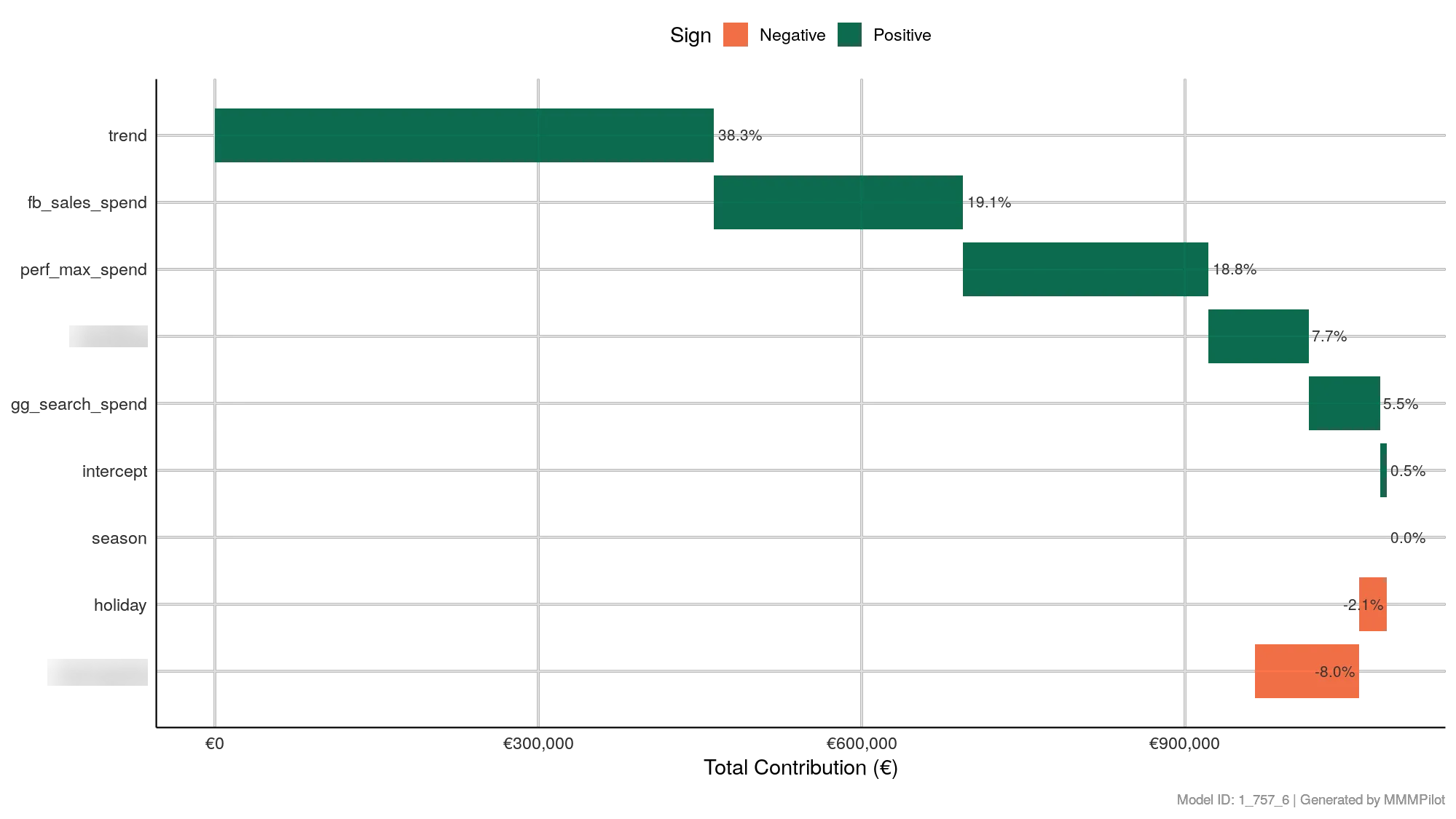
The “Executive Summary” of Your Growth
If you only look at one chart to explain your business performance to a client or stakeholder, make it this one.
The Total Response Decomposition chart (often called a Waterfall Chart) is the final scoreboard. It sums up every single day of data from your analysis period to answer one simple question: “In total, what drove our revenue?”
It ranks every factor—from your Facebook ads to the economy—by its total contribution to your bottom line.
How to Read the Chart
1. The Bars: Credits vs. Debits
This chart works like a balance sheet.
- Green Bars (Positive): These factors added revenue.
- Examples: Your Paid Media (e.g.,
fb_sales_spend), Organic Traffic, or a positive Trend.
- Examples: Your Paid Media (e.g.,
- Red/Orange Bars (Negative): These factors subtracted revenue.
- Examples: Competitor Activity (Cannibalization), Negative Seasonality, or economic downturns.
2. The Values: Volume & Percentage
Next to each bar, you will see two numbers:
- The Percentage: The share of total sales explained by this factor (e.g., “19.1%”).
- The Magnitude: The length of the bar represents the total monetary value (or conversion count).
Key Components to Analyze
The “Base” (Trend & Intercept)
You will often see trend or intercept at the top of the list.
- What it is: This is your Baseline Revenue. It represents the sales you would have made even if you turned off all marketing tomorrow (due to brand loyalty, physical presence, etc.).
- The “Healthy” Mix: A healthy business usually has a strong baseline (40-60%). If your baseline is tiny, your business is “addicted” to paid ads. If it’s too huge (90%), your ads aren’t doing much.
The “Incremental” (Media Channels)
Look at your marketing channels (e.g., fb_sales_spend, gg_search_spend).
- The Ranking: This chart definitively ranks your channels by Effectiveness (Total Volume), not efficiency (ROI).
- Note: A channel might be #1 on this list because you spent the most money on it, not because it has the best ROI. Always compare this with the ROI Chart for the full picture.
The “Headwinds” (Negative Factors)
Look at the red bars at the bottom.
- Competitors: If you see a specific competitor variable here (e.g.,
competitor_X), the size of the bar tells you exactly how much revenue they “stole” from you during the period. - Seasonality/Holidays: In the example image,
holidayis negative (-2.1%). This means that, on average, holidays distract your customers and reduce sales volume compared to normal days.
Strategic Analysis: The “Pilot’s” View
1. Validate the Investment “We spent $50k on Google Ads. Did it matter?” Look at the bar. If the Google Ads bar is tiny (e.g., <1%) despite high spend, you have a problem.
2. Check the Context “Why did we miss our target?” If you see a massive red bar for competitor_price_drop, you have your answer. It wasn’t your ad creative; it was the market conditions.
3. The “Base” Health Check If your trend bar is green and large, your brand is healthy. If the trend is negative (red), your paid media is fighting a losing battle against a shrinking brand or market.