
Visualizing the Optimization: The Allocator Response Curves
The “Flight Path” for Your Budget
When you run the Budget Allocator in MMM Pilot, the system calculates the mathematical “sweet spot” for every marketing channel. But simply seeing a new budget number isn’t enough—you need to understand why the system suggests moving money around.
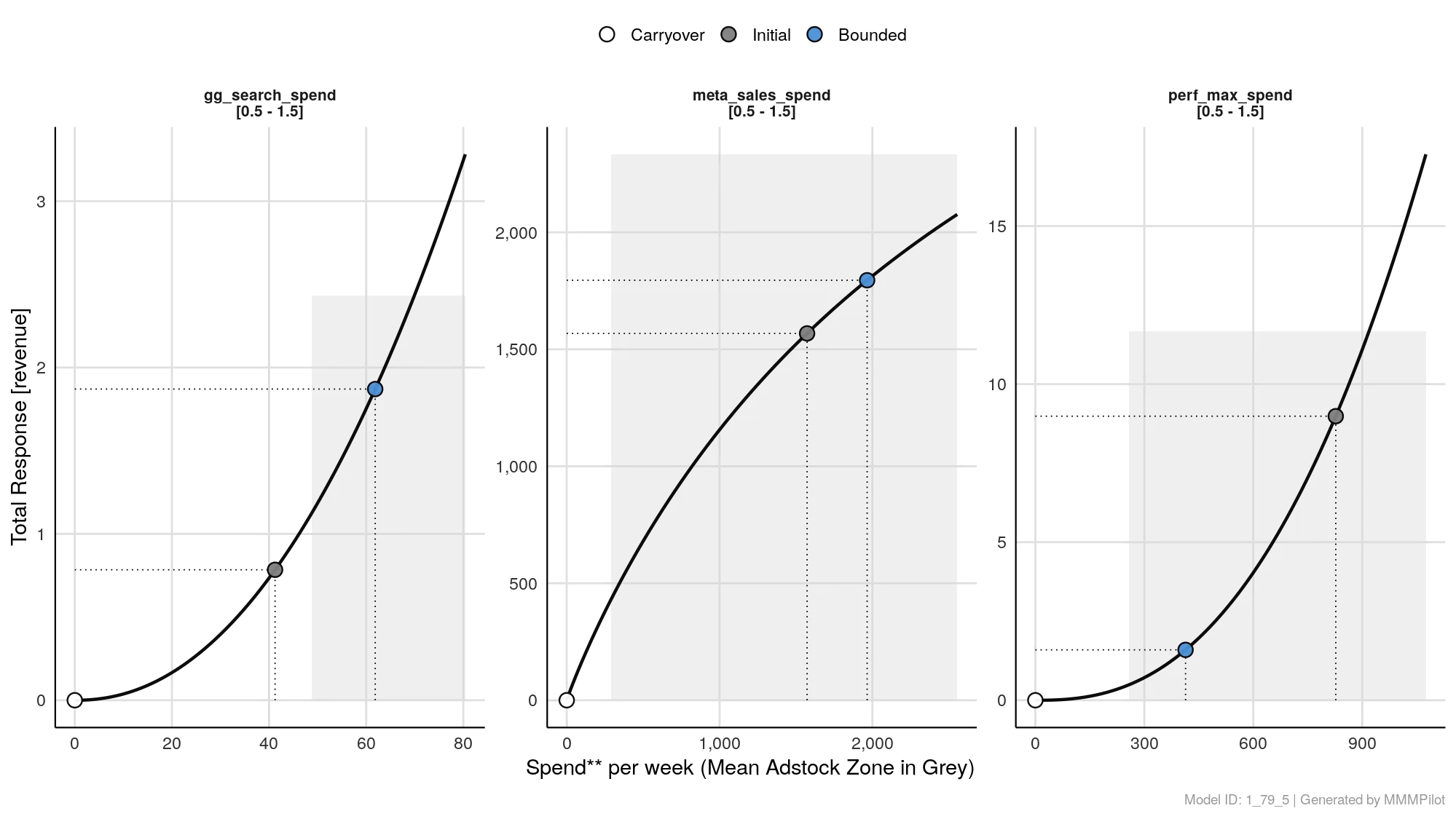
The Simulated Response Curve chart visualizes this decision. It shows you the exact path from your Current Spend (where you are now) to the Optimal Spend (where you should be), mapped against the performance potential of each channel.
How to Read the Chart
Each panel represents one marketing channel. Here is how to navigate the visual elements:
1. The Curve (The Performance Road)
The black line is the Saturation Curve. It represents the relationship between how much you spend (X-Axis) and how much revenue you get back (Y-Axis).
- Steep Slope: High efficiency. Every extra dollar spent yields a high return.
- Flat Slope: Diminishing returns. Spending more yields very little extra revenue.
2. The Dots (Your Position)
- Grey Dot (Initial): This is your historical average. It marks “Where you were” during the selected time period.
- Blue Dot (Bounded/Optimal): This is the recommendation. It marks “Where you should be” to maximize total returns.
- The Move: The distance between the Grey and Blue dots represents the budget shift.
- Blue dot is higher/right of Grey: Scale Up. The channel has room to grow.
- Blue dot is lower/left of Grey: Cut Back. You were overspending and hitting diminishing returns.
3. The Grey Zone (The “Known World”)
You will often see a light grey shaded box in the background.
- What it is: This represents the range of spend levels you have historically tested.
- Why it matters: It is a “Reality Check.”
- If the Blue Dot is inside the grey box, the prediction is very safe because you have spent this amount before.
- If the Blue Dot is far outside the grey box, the model is extrapolating (guessing) based on the curve trend. Proceed with “Explorer” caution in these territories.
4. The Constraints (Top Label)
At the very top of each chart, you will see numbers like [0.5 - 1.5].
- This indicates the rules you gave the Allocator.
- Example:
[0.5 - 1.5]means you told the AI: “Do not cut the budget below 50% and do not increase it more than 150% of my historical average.” The Blue dot will always respect these boundaries.
Strategic Analysis: The “Pilot’s” View
Use this chart to diagnose the “Why” behind the budget recommendation:
Scenario A: The “Missed Opportunity”
- Visual: The curve is still steep, and the Blue dot is far to the right of the Grey dot.
- Insight: You were driving with the handbrake on. This channel is highly responsive, and you haven’t hit the ceiling yet. Aggressive growth is recommended.
Scenario B: The “Wasted Fuel”
- Visual: The curve has flattened out (horizontal), and the Grey dot sits on that flat part. The Blue dot pulls you back to the left (down the curve).
- Insight: You were “pushing on a string.” You spent money just to maintain presence, but it didn’t generate incremental sales. Cutting budget here increases overall ROI.