
Decoding the Cluster "Elbow": The Grouping Diagnostic
Robyn MMM / pareto_clusters_wss.png
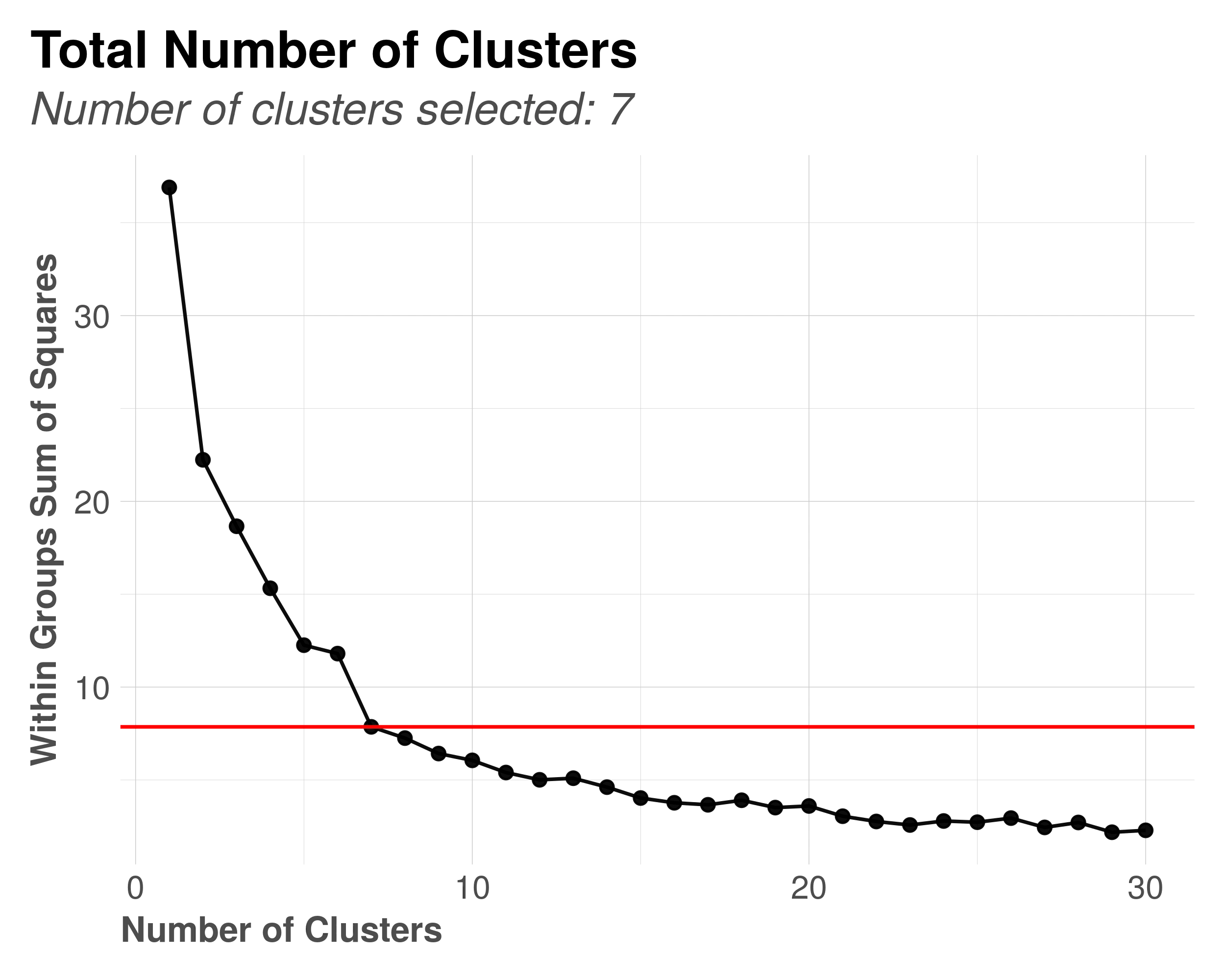
Why am I seeing this? You’ve just finished a run, and MMM Pilot has grouped the hundreds of successful models into a few manageable “families” or clusters. This chart, pareto_clusters_wss.png, is the mathematical justification for why it chose that specific number of groups.
This is not a chart of sales or performance; it is a chart of similarity. It answers the question: “How many distinct ‘types’ of models did we actually find?”.
1. The View: What You’re Looking At
This is a technical diagnostic plot known as an “Elbow Plot”.
- The X-Axis (Number of Clusters): This represents the number of groups we could divide the models into.
- The Y-Axis (Total Within Sum of Squares - WSS): This measures “Compactness.” It tells us how similar the models are within their assigned groups.
- High WSS: The models in the group are very different from each other (the group is “loose”).
- Low WSS: The models in the group are almost identical (the group is “tight”).
- The Curve: As you move right (increasing the number of clusters), the WSS naturally drops because more groups mean smaller, tighter families.
2. The Insight: Finding the “Elbow”
You are looking for the point where the curve bends sharply, like a human elbow.
- The Logic: If you have 100 models, dividing them into 2 groups might still leave them very messy (High WSS). Dividing them into 100 groups (1 model per group) makes them perfectly “tight” (Zero WSS) but is useless for analysis.
- The Sweet Spot: The “Elbow” is the point of diminishing returns. It is where adding one more cluster doesn’t make the groups significantly tighter. This is the optimal number of clusters for your data.
Example:
If the curve drops steeply from 1 to 3, and then flattens out from 3 to 10, the “Elbow” is at 3. This means your models naturally fall into 3 distinct “tribes” (e.g., “The High TV Tribe,” “The High Facebook Tribe,” and “The Balanced Tribe”).
3. The Automation: How Robyn Decides
You don’t need to pick the number yourself. The system automates this using the “5% Rule”:
- It calculates the WSS for every possible cluster count (1 to 20).
- It looks for the point where adding another cluster reduces the WSS by less than 5%.
- It automatically selects that number (typically between 3 and 6) and presents those “Representative Models” to you in the final report.
4. Navigator’s Check: Is the Grouping Real?
Use this plot to verify if the AI found distinct patterns or if it’s struggling.
- ✅ Sharp Elbow: If you see a clear, sharp bend (like an L-shape), it means the models are very distinct. The AI has found clear, contrasting strategic options for you to choose from.
- ❌ Smooth Curve: If the line is a smooth, gentle slope with no clear bend, it means the models are all “kind of similar” but with slight variations. The clustering here is somewhat arbitrary.