
How to Read the "Pareto Clusters Detail" Plot
This image is actually three charts in one. Here is the breakdown of each section:
1. Bottom Right: The Strategy Map (Scatter Plot)
Title: “Selecting Top 1 Performing Models by Cluster”
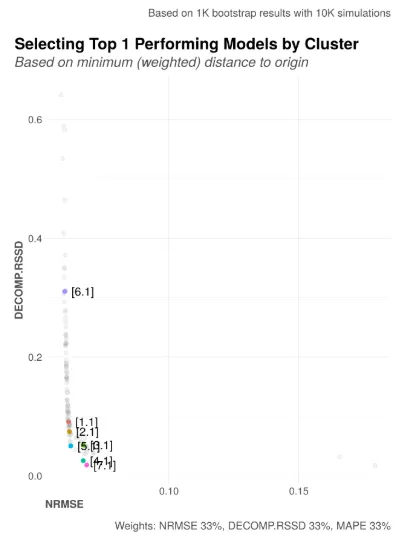
This is your starting point. It maps every single model the AI created onto a 2D grid to show the trade-off between accuracy and logic.
- The Dots: Each grey dot is a different model. The Colored Dots represent the “Champion” (best model) from each cluster.
- X-Axis (NRMSE): This measures Error.
- Left is better. It means the model’s predictions match your actual sales history very closely.
- Y-Axis (DECOMP.RSSD): This measures Business Logic.
- Bottom is better. A low RSSD means the model is “realistic”—it doesn’t claim that a channel with 1% of the budget drove 90% of the sales (a common hallucination in bad models).
- The “Pareto Front” (The Curve): You will notice the best models form a curve in the bottom-left corner. This is the “efficient frontier” where you get the best balance of low error and high logic.
- Clusters: The colors group models that tell a similar story. For example, Cluster 1 (Red) might represent models where “TV is dominant,” while Cluster 2 (Blue) might represent models where “Facebook is dominant.”
How to use it: Look for the colored dot closest to the bottom-left corner (the origin). That is mathematically the strongest candidate.
2. Bottom Left: The ROI Comparison (Bar Charts)
Title: “Top Performing Models”
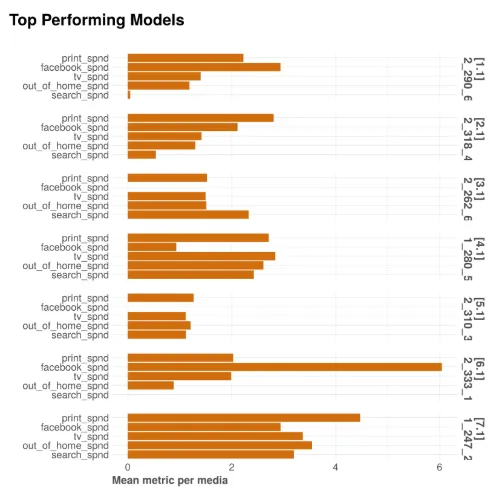
Once you see the clusters on the map, look here to see what they actually say about your marketing performance. This section lists the “Champion” model from each cluster side-by-side.
- The Labels (Y-Axis): You see specific model IDs (e.g.,
2_290_6,2_318_4). The number in brackets (e.g.,[1.1]) refers to the Cluster ID. - The Bars (X-Axis): These represent the Mean Metric per Media (usually ROAS or CPA).
- The Insight: This allows you to compare strategic realities.
- Example: Look at the top model (Cluster 1). It might show
facebook_spnd(orange bar) as the longest bar, meaning Facebook has the highest ROI. - Compare: Now look at the second model (Cluster 2). It might show
tv_spndas the winner.
- Example: Look at the top model (Cluster 1). It might show
How to use it: Ask yourself, “Which of these ROI breakdowns aligns best with my business intuition?” If you know for a fact that TV was a disaster last year, reject the cluster that shows TV having high ROI, even if its error score is low.
3. Top Section: The Confidence Check (Density Plots)
Title: “In-Cluster ROAS & bootstrapped 95% CI”
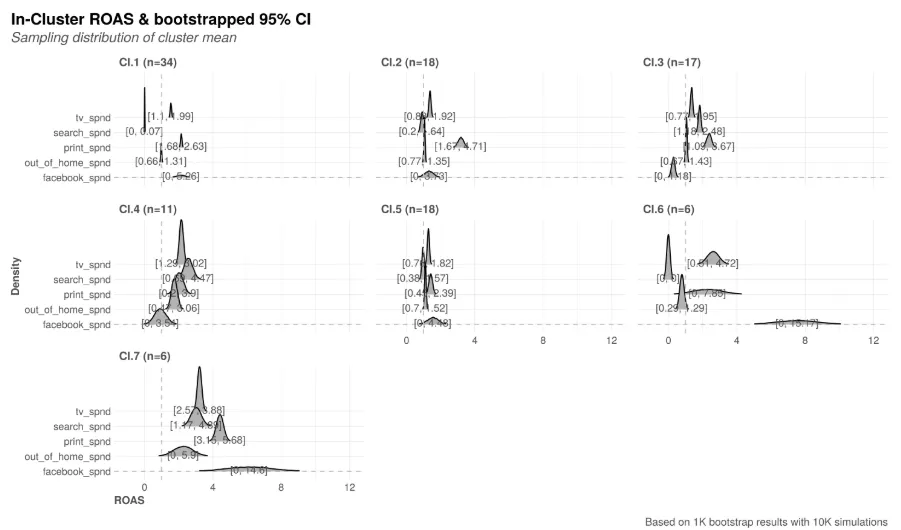
This is the most technical part. It visualizes the uncertainty within each cluster.
- The Curves: These are “Density Plots.” Think of them like mountains.
- Tall & Skinny Mountain: The model is very sure. All the calculations for this channel’s ROI are clumped tightly together.
- Short & Wide Hill: The model is unsure. The ROI could be very low or very high; the data is noisy.
- The Channels: Each line represents a media channel (e.g.,
tv_spnd,search_spnd). - The Clusters (Columns):
Cl.1,Cl.2, etc., correspond to the clusters in the other two charts.
How to use it:
- Look for sharp peaks. If
Cl.1shows a sharp peak forfacebook_spndaround an ROI of 2.0, you can be confident in that number. - Avoid flat lines. If a cluster shows a flat or double-humped line for a major channel, it means the model is unstable or confused about that channel’s contribution.
Summary Checklist for the Analyst
- Check the Map (Bottom Right): Find the clusters closest to the bottom-left corner.
- Check the Story (Bottom Left): Do the ROI results for those top clusters make business sense?
- Check the Certainty (Top): Does the cluster you like have tight, sharp peaks (high confidence) or wide, flat hills (high uncertainty)?
This process ensures you don’t just pick the model with the best math, but the one that is robust and strategically sound.