
Decoding the Hypersampling Plot
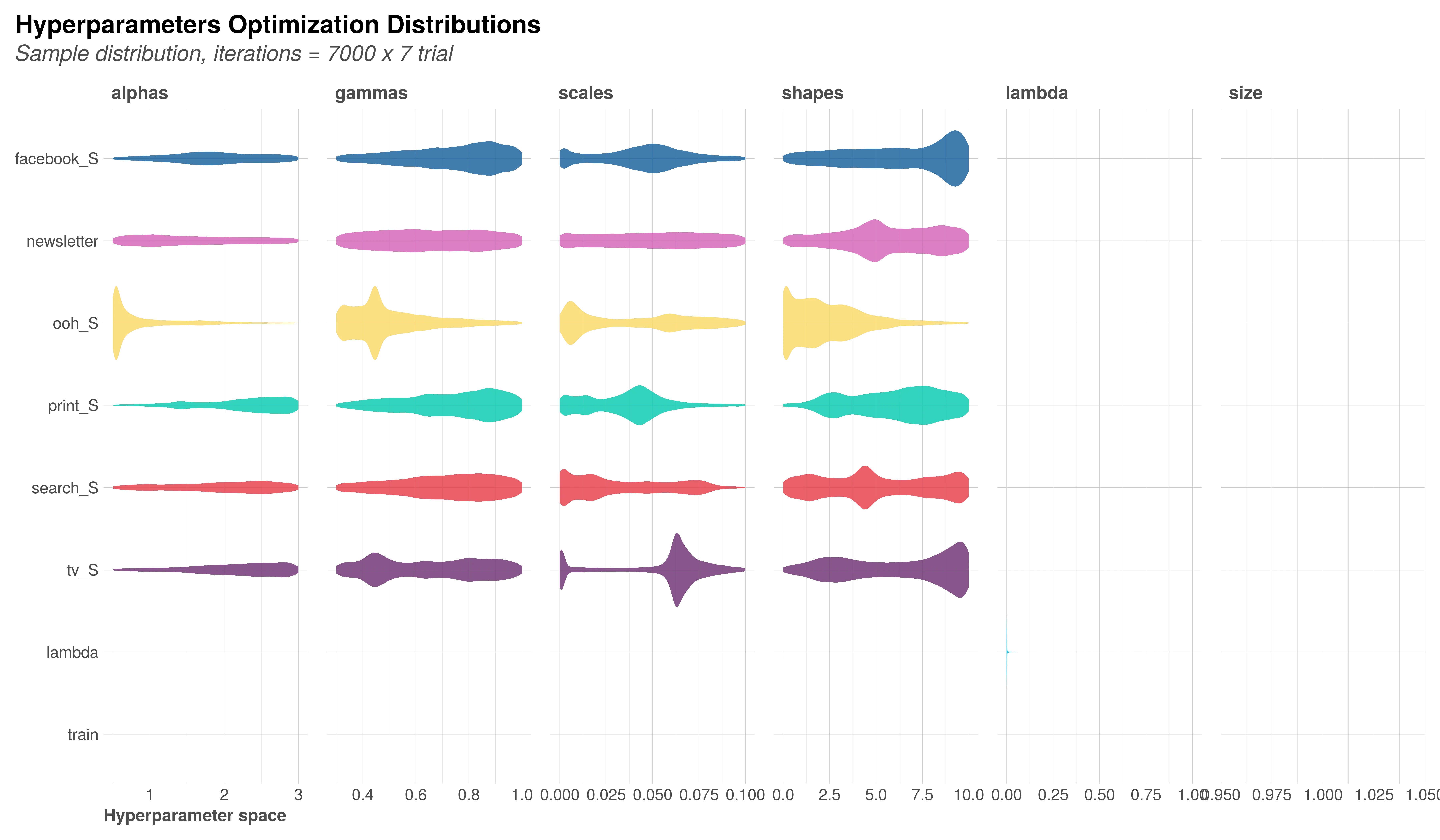
Why am I seeing this? You’ve just completed an analysis run, and MMM Pilot has generated a file called hypersampling.png. While the “Pareto Front” tells you which models are best, the Hypersampling plot tells you if the model is confused.
This chart is your convergence diagnostic. It visualizes the thousands of “trial runs” the system performed to understand your data, mapping the relationship between specific settings and model error.
1. The View: What You’re Looking At
Think of this plot as a map of the territory the model explored. It breaks down how different settings (hyperparameters) impacted the accuracy of the analysis.
- The X-Axis (The Settings): These are the variables you configured in the Field Mapping stage. They represent the specific “levers” the model pulled, such as:
- Adstocks (Thetas/Shapes): The “carry-over” effect, or how long an ad influences a customer after they see it.
- Saturation (Alphas/Gammas): The point of “diminishing returns,” or how quickly performance flatlines as spend increases.
- The Y-Axis (The Error): This represents the model’s “miss rate” (typically NRMSE or DECOMP.RSSD).
- Lower is Better. A dot at the bottom means the model fit the data well. A dot at the top means the model failed to explain your sales patterns.
- The Dots: Each dot is a single “experiment” or iteration the system ran to test a specific combination of settings.
2. The Insight: How to Read the Pattern
You are looking for a Funnel, not a Scatter.
✅ The Good Signal: “Convergence”
If the dots create a V-shape or cluster tightly at the bottom of the chart, it means the model found a “sweet spot.”
- Translation: “I am confident that the Adstock for this channel is between 0.2 and 0.4. Anything else produces high error.”
- Navigator Action: You can trust these results. This confirms the data contains a strong, readable signal for this channel.
❌ The Bad Signal: “Dispersion”
If the dots are spread evenly across the entire width of the X-axis with no clear dip—looking like a rectangular block or a random cloud—the model is indifferent.
- Translation: “I tried every possible setting, and they were all equally effective (or ineffective). I found no distinct pattern.”
- Navigator Action: The model hasn’t learned anything specific about this channel. This usually means the data is too sparse, or the channel simply doesn’t impact sales significantly enough to be measured.
3. Automated Refinement
You do not need to manually calculate the next step. When a run is complete, MMM Pilot’s AI Analysis Module automatically reviews these performance clusters.
If the system detects a strong convergence pattern (a “Good Signal”), it will suggest improved, narrower hyperparameter ranges for your next run. You can then use the “Duplicate with suggested hyperparameters” feature to refine your analysis immediately.
4. Critical Warning: The Overfitting Trap
While it is tempting to narrow your ranges as much as possible to get a “perfect” fit, you must be careful.
What is Overfitting? Overfitting occurs when the model stops learning the market logic and starts memorizing the historical data. If you restrict the hyperparameters too tightly (e.g., forcing a TV adstock to be exactly 0.5), you might force the model to produce a mathematically perfect line that makes no business sense and fails to predict future sales.
Best Practices for Safe Tuning:
- Don’t “Handcuff” the Model: Even if the plot suggests a perfect value of 0.3, keep the range slightly open (e.g., 0.2 to 0.4) in the next run. This allows the model to adapt if new data shifts slightly.
- Business Logic Check: Always ask: “Does this make sense?” If the hypersampling plot suggests a digital banner ad has a memory effect of 6 months (extremely high Adstock), the model is likely overfitting to a random trend. You should reject that suggestion and manually constrain the range to something realistic.
- Validate with “Holdout”: Use the Forecast plot to see how well the model predicts data it hasn’t seen yet. If the hypersampling looks perfect but the forecast is wrong, you have overfitted.