
The Payoff: Reading the Budget Optimization Results
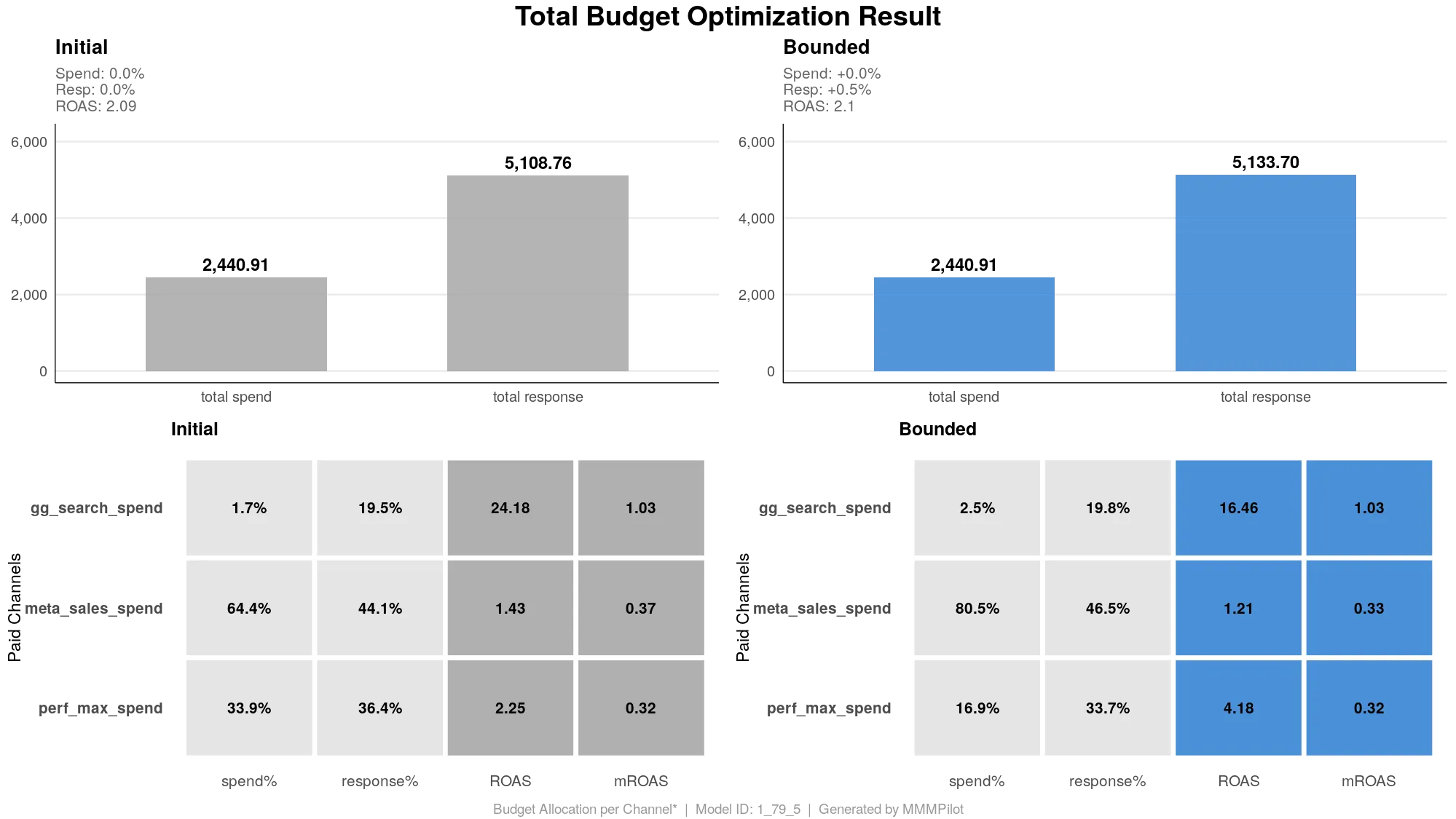
The “Before & After” of Your Marketing Strategy
If the Simulated Response Curve is the map, this chart is the destination. It answers the most critical question in marketing: “If I keep my budget exactly the same but spend it differently, how much more money could I make?”
The Total Budget Optimization Result chart compares your historical performance (Initial) against the AI’s recommended strategy (Bounded).
Part 1: The Big Picture (Top Bar Charts)
The top section gives you the headline number—the potential “free” growth available in your current budget.
- Left Side (Grey - Initial): This is your reality. It shows the total amount you spent and the total revenue (Response) you actually generated during the selected period.
- Right Side (Blue - Bounded): This is the potential. It shows the exact same spend, but with a higher Total Response.
- The Gap: The difference between the two “Response” bars represents Efficiency Revenue. This is revenue lost to inefficient allocation—money left on the table because high-performing channels were starved while low-performing channels were saturated.
Note: “Bounded” means the AI optimized your budget within the rules set by MMM Pilot (e.g., “Don’t increase Facebook spend by more than 50%”). It is a realistic, safe recommendation, not a theoretical fantasy.
Part 2: The Deep Dive (Channel Breakdown)
The bottom section breaks down the strategy channel by channel. It is split into two blocks: Initial (History) and Bounded (Recommendation).
Here is how to read the four key metrics:
1. Spend% (The Slice of the Pie)
- What it is: The percentage of your total budget allocated to this channel.
- The Action: Compare the Grey
spend%to the Bluespend%.- Example: If “TV” goes from 30% (Initial) to 15% (Bounded), the model is telling you to cut funding.
- Example: If “Search” goes from 10% to 25%, the model is telling you to scale up.
2. Response% (The Contribution)
- What it is: The percentage of total sales driven by this channel.
- The Insight: Ideally, a channel’s Response% should be higher than its Spend%. That indicates high efficiency.
3. ROAS (Return on Ad Spend)
- What it is: The average return. If you spent $1 and got $4 back, your ROAS is 4.0.
- The Context: This looks backward at what happened.
4. mROAS (Marginal ROAS) - The Secret Weapon
- What it is: The return on the next dollar you spend.
- Why it matters: This is the metric the AI uses to make decisions.
- A channel might have a high Average ROAS (5.0) but a low Marginal ROAS (0.5) because it is saturated—spending more won’t help.
- The Goal: The Allocator moves money away from low mROAS channels and puts it into high mROAS channels until the mROAS is roughly equal across the board.
Summary for the Analyst
When presenting this to a stakeholder, focus on the delta (the change):
- Identify the Winners: “The model suggests scaling
search_spendbecause its Marginal ROAS is still high (it hasn’t hit saturation).” - Identify the Waste: “We are overspending on
tv_spend. We can cut 20% of the budget there without hurting sales because we hit the flat part of the curve.” - The Bottom Line: “By making these shifts, we can drive X% more revenue without asking Finance for more budget.”