
Decoding the Robyn "Model One-Pagers"
What are these files?
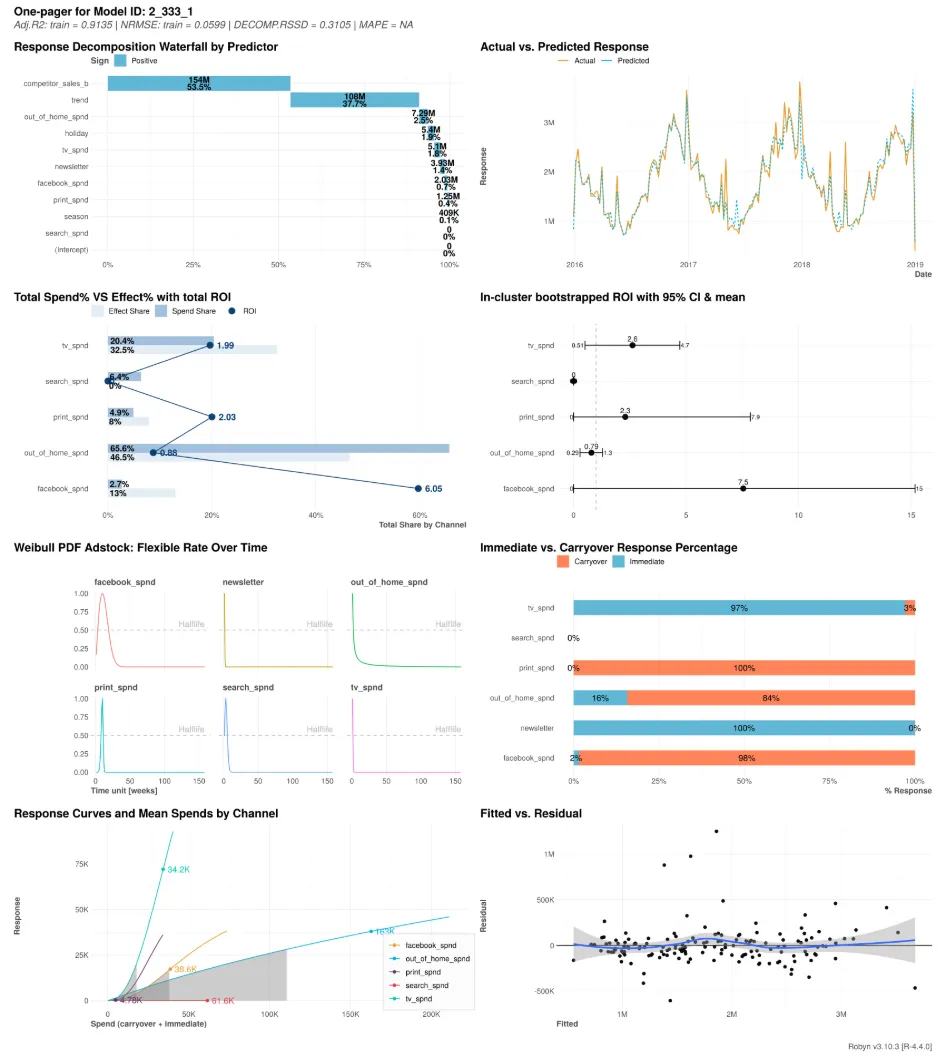
In your results folder, you will see several image files with names like 1_290_6.png or 2_333_1.png. We call these Model One-Pagers.
Think of each file as a “Resume” for a specific version of the marketing model.
Why are there multiple files?
Marketing Mix Modeling is not about finding one answer; it is about finding the best answer among many possibilities.
- The Process: The AI generates thousands of potential models, testing different combinations of ad effectiveness and decay rates.
- The Candidates: It filters these down to the “Pareto Front”—the top performers that balance accuracy with logic.
- The Result: Each file represents one of these top candidates. While MMM Pilot automatically selects the best one for your dashboard, we provide the full “Resumes” of all top candidates for total transparency.
The Anatomy of a One-Pager
Each One-Pager contains 8 diagnostic charts that tell the complete story of that specific model. Here is how to read them.
1. Response Decomposition Waterfall
What it shows: This is the “Accounting Ledger” of your sales. It breaks down your total revenue (or conversions) into the specific building blocks that created it.
- Blue bars: Revenue driven by positive factors (e.g., Media Spend, Holidays).
- Red bars: Revenue lost to negative factors (e.g., Competitor actions).
- Grey bar (Intercept): The baseline revenue you would have earned even if you stopped all marketing.
2. Actual vs. Predicted Response
What it shows: The “Reality Check.” It overlays the model’s predictions (Orange line) on top of your actual historical sales (Teal line).
- Goal: You want these lines to hug each other closely. If they move in sync, the model understands your business cycles.
3. Total Spend% vs. Effect% (with ROI)
What it shows: The “Efficiency Truth.” It compares how much you paid for a channel (Spend Share) versus how much value it actually delivered (Effect Share).
- The Insight: If a channel is below the diagonal line, you are spending more than you are getting back (Inefficient). If it is above, it is punching above its weight (Efficient).
4. In-cluster Bootstrapped ROI
What it shows: The “Certainty Test.” It shows the calculated ROI for each channel, but with a range (a horizontal line) representing the 95% Confidence Interval.
- The Insight: A short line means the model is very sure about that channel’s ROI. A very long line means the model is guessing because the data is noisy.
5. Weibull PDF Adstock (Decay Rate)
What it shows: The “Memory” of your ads. It visualizes how long an ad continues to generate sales after it has been seen.
- The Curve: A curve that drops instantly means the ad only works today. A curve that stretches out means the ad builds brand equity that pays off weeks later.
6. Response Curves & Mean Spends
What it shows: The “Saturation Point.” These curves show the relationship between how much you spend and how much you get.
- The Shape: Steeper is better. If the curve flattens out (becomes horizontal), it means you have hit “Diminishing Returns”—spending more money here won’t bring more sales.
7. Immediate vs. Carryover Response
What it shows: The “Patience Split.” It reveals what percentage of sales happen now vs. later.
- Immediate (Blue): Sales that happen in the same week as the ad.
- Carryover (Orange): Sales that happen in future weeks due to adstock effects.
8. Fitted vs. Residual
What it shows: The “Error Pattern.” It checks if the model’s mistakes are random or systematic.
- Goal: You want to see a random cloud of dots around the horizontal line. If you see a clear shape (like a “U” or a diagonal line), the model has missed a major trend in your data.