
How to Read the "Actual vs. Predicted" Chart
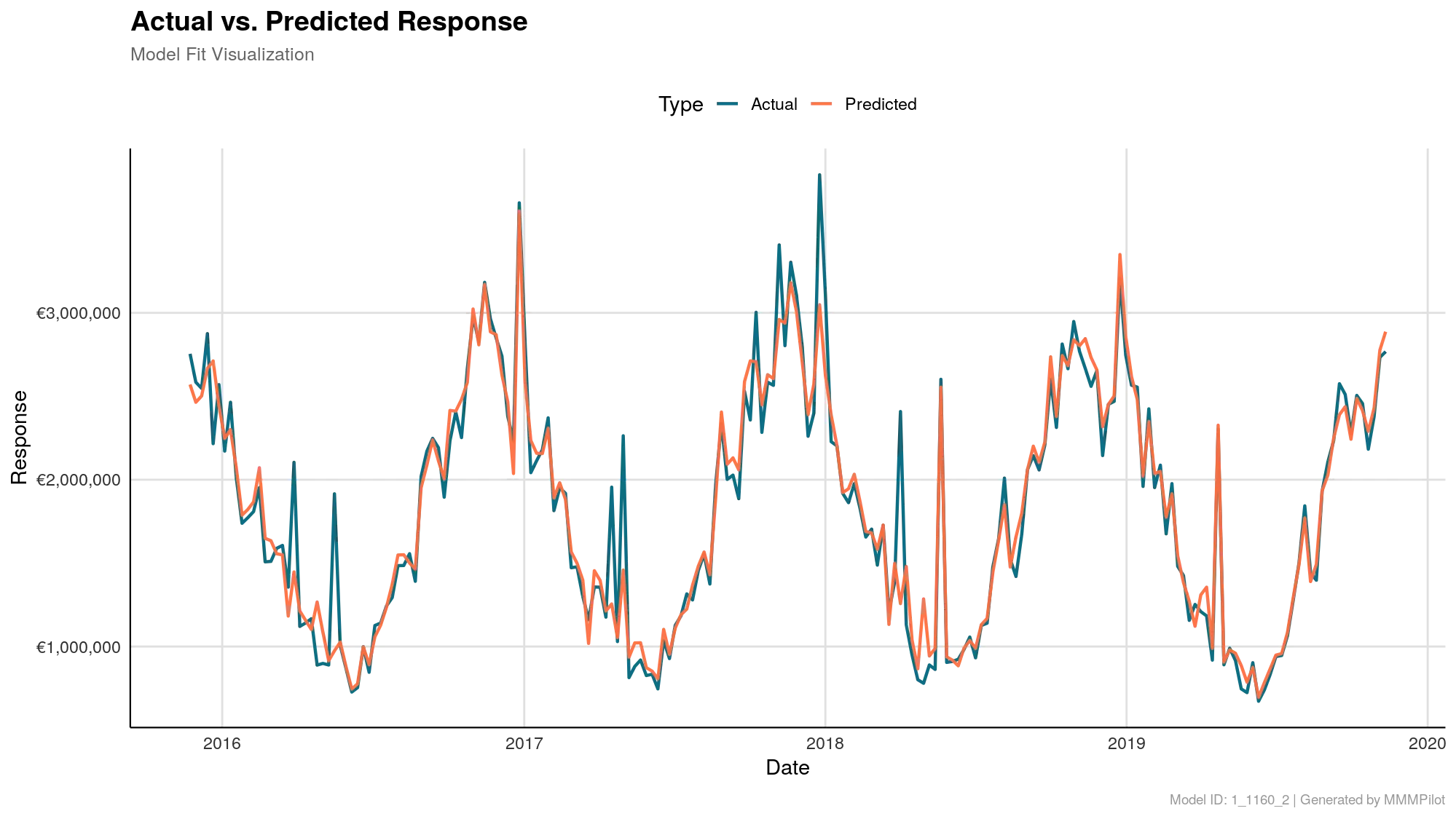
The “Reality Check” for Your Model
The Actual vs. Predicted Response diagram is arguably the most important chart in your results folder. Think of it as a “lie detector” or a reality check for the mathematics.
Before you look at which channels drove the most ROI, you need to answer one question: “Does this model actually understand my business?”
This chart answers that question by comparing what really happened against what the model thinks happened.
What the Lines Mean
You will see two distinct lines moving across the timeline:
- The Actual Line (Teal): This represents your real-world historical data. It is the actual Revenue or Conversions you uploaded to the system. This is the undeniable truth.
- The Predicted Line (Orange): This is the model’s attempt to recreate history. Based on the media spend, seasonality, and economic data provided, this is what the AI calculated your performance should have been.
How to Interpret the Results
1. The “Hugging” Effect (Good)
In an ideal scenario, the Predicted (Orange) line should closely hug the Actual (Teal) line. They should move up and down in sync.
- What it means: The model has successfully identified the patterns in your marketing. It understands why your sales spiked in December or dipped in February.
- The Verdict: You can trust the insights and budget recommendations derived from this model.
2. Large Gaps (Caution)
If you see significant gaps where the Orange line goes straight while the Teal line spikes (or vice versa), the model is “missing” something.
- What it means: There was a driver of sales that the model didn’t see. Perhaps you ran a massive promotion that wasn’t flagged, or a competitor did something drastic that affected you.
- The Verdict: Use the insights with caution. The model might be underestimating certain channels.
The Key Metric: R-Squared (R²)
You will often see a score called R-Squared (or R²) associated with this chart. You don’t need a degree in statistics to read it:
- Think of it as a percentage grade: An R² of 0.89 means the model explains 89% of what happened to your sales.
- The Threshold: Generally, in MMM Pilot, we look for an R² above 0.80. If it drops below this, the system may flag it as “Low Reliability”.
The “Haze” (Confidence Interval)
In some versions of this chart, you may see a light shaded area surrounding the Predicted line.
- This is the 95% Confidence Interval.
- It represents the model’s honesty about uncertainty. It is telling you: “I predict the result is the orange line, but I am 95% sure the real number falls somewhere inside this shaded cloud.”.
Summary
- Matches closely? ✅ The model is accurate. Proceed to the ROI analysis.
- Big gaps? ⚠️ The model needs more context (like holiday flags or competitor data).